Nederlands
  Français
  Deutsch
If some websites cause issues when loading or don't show updated contents, it's possible that it's because of the cache. Get to know, how to delete the cache in the browser Mozilla Firefox.
1. Fast delete with the keyboard shortcut
For deleting the browser cache with a shortcut in Firefox please follow these steps:
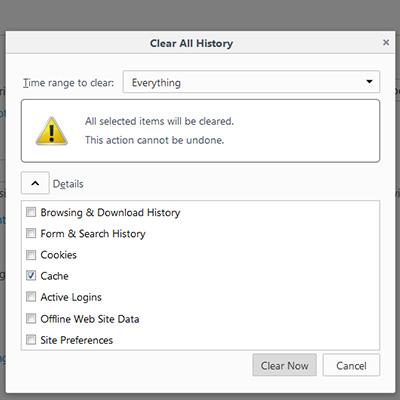
- Press following keys at once: [Ctrl], [Shift] and [Del]. A Popup opens with the title "Clear recent history".
- In the dropdown menu, you can define the time range you want to delete the cache. You have the following options: last hour, last two hours, last four hours, today or all.
- To delete all data, select "All" from the dropdown-menu...
- Afterwards, click on the arrow next to "Details" and toggle the different possibilities to chose which data should be deleted. If you want to delete only the cache, then only mark the checkbox next to "Cache".
- With a click on the button "clear now" you delete the cache.
- Reload the site afterwards
2. Delete the cache with the window option in Firefox
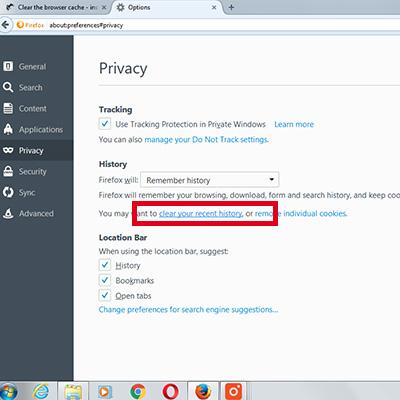
Alternatively you can also clear the cache also through the window-menu. Please follow these steps:
- Press the key "Alt" on your keyboard. The window menu from firefox opens.
- In the menu, "History" select "Clear Recent History…"
- Now the Popup-Window opens like described in the instructions above.
- Follow the steps above from the second step.